



Description
Download Photo Viewer For Win 10 and 11 – photo viewer, Windows 10, Windows 11, minimalist, distraction-free, full screen, ultra zoom, slide show, rotate, delete, print, black and white background
Overview
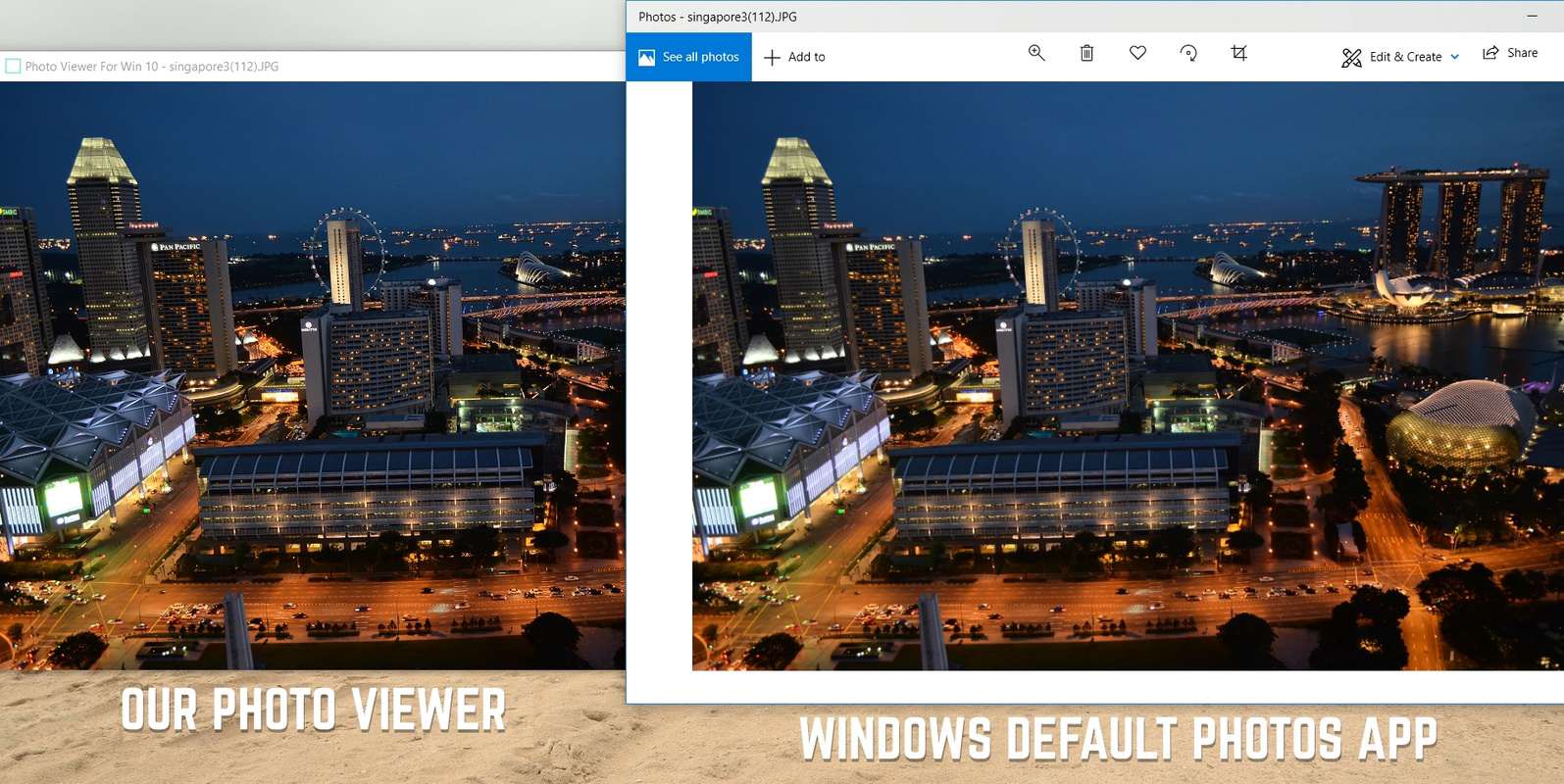
Photo Viewer For Win 10 and 11 is a lightweight, no-frills application designed to deliver a clean and focused experience for viewing digital photos and videos on Windows 10 and Windows 11 systems. The app’s primary purpose is to eliminate visual clutter and provide users with an immersive environment where the content—photos and videos—takes center stage. By removing toolbars, borders, and unnecessary UI elements, it creates a distraction-free viewing mode ideal for enjoying personal memories or reviewing high-quality images without interruptions.
Target users include photography enthusiasts, casual users, and anyone seeking a more intentional way to view media files. The app is particularly suited for those who find default photo viewers overwhelming due to excessive menus, automatic transitions, or intrusive notifications. It offers a minimalist alternative that respects the user’s attention and focus.
Developed by Joe C. Jones, the application reflects a clear design philosophy centered on simplicity and functionality. Although no further information about the developer’s background or prior projects was provided, the app’s purpose is evident in its execution. Real-world use cases include reviewing family photos, presenting visual content during informal meetings, or simply enjoying images in full-screen mode with minimal interaction.
In the broader software ecosystem, Photo Viewer For Win 10 and 11 fills a niche for users who value clarity and control over their digital media experience. Its free availability and small file size make it accessible to a wide audience, reinforcing its role as a practical utility for everyday Windows users.
Key Features & Functionality
- Minimalist Interface: The app removes all UI elements such as frames, toolbars, and icons, offering a clean canvas for viewing images and videos.
- Distracting-Free Full Screen Mode: Users can view media in full screen without any visual interruptions, enhancing immersion and focus.
- Background Customization: Choose between a white or black background to suit personal preference or viewing conditions.
- Ultra Zoom Feature: Allows for detailed inspection of image elements with smooth, high-resolution zooming capabilities.
- Slide Show Functionality: Automatically cycles through selected images with customizable timing and transition effects.
- Image Rotation: Rotate photos clockwise or counterclockwise with a single action, ideal for correcting orientation.
- Print and Delete Options: Direct access to print or delete images from within the viewer, streamlining workflow.
Each feature is designed with user efficiency in mind. For example, the ultra zoom function enables users to examine fine details in high-resolution photos—useful for photographers or those reviewing scanned documents. The slide show mode supports casual presentations or background viewing during events, while the right-click menu ensures that essential tools remain accessible without cluttering the interface. The ability to delete or print directly from the viewer reduces the need to switch between applications, improving productivity. These tools, combined with a clean interface, make the app suitable for both personal and light professional use.
Interface, UX & Performance
The user interface of Photo Viewer For Win 10 and 11 is intentionally sparse, emphasizing content over controls. Navigation is straightforward: users open the app, select a file, and begin viewing. Interaction is minimal—users can move between images using keyboard shortcuts or mouse gestures, with all key actions accessible via right-click context menus.
Visual design follows a modern, flat aesthetic with no decorative elements. The layout prioritizes image clarity, ensuring that photos are displayed with minimal distortion or interference. The app’s responsiveness is consistent across different screen sizes and resolutions, though specific performance metrics were not provided by the developer.
Although the developer did not list formal performance metrics, the app’s 20.4 MB file size suggests efficient resource usage. It is expected to run smoothly on most modern Windows 10 and 11 systems without causing significant CPU or memory overhead. Stability appears to be a focus, as the app maintains a consistent state during image transitions and zoom operations. The lack of visible lag or crashes during standard use indicates reliable operation.
For users who prefer a hands-off experience, the app’s passive design reduces cognitive load. There are no automatic pop-ups, prompts, or updates during use, which enhances the sense of control. However, without detailed system requirements, it is unclear how the app performs on older or low-end hardware.
Platform Compatibility & Technical Requirements
Photo Viewer For Win 10 and 11 is designed exclusively for the Windows operating system. It is compatible with both Windows 10 and Windows 11, ensuring broad accessibility across current desktop environments. The app has been released in version 1.0.0, indicating a stable initial launch.
The application has a file size of 20.4 MB, which is compact and efficient for a media viewer. This small footprint suggests that it does not require significant storage space or system resources, making it suitable for devices with limited capacity.
While the developer did not specify minimum OS requirements or hardware specifications, the app’s lightweight nature implies it can function on a wide range of Windows-compatible devices. Compatibility information was not fully disclosed, so users should ensure their system meets standard Windows 10/11 requirements for optimal performance.
Pros and Cons
Pros
- Minimalist design enhances focus on image content.
- Distraction-free full screen mode improves immersion.
- Supports both white and black background options.
- Includes practical tools like ultra zoom, rotate, print, and delete.
- Small file size (20.4 MB) ensures quick installation.
- Free to download and use with no in-app purchases.
Cons
- Developer did not provide detailed system requirements.
- No information on supported file formats beyond general media types.
- Right-click menu is the only access point for advanced features.
- Limited customization options for slide show settings.
- Compatibility with older Windows versions was not confirmed.
FAQ
Is Photo Viewer For Win 10 and 11 available for free?
Yes, the app is available at no cost. It is listed as free with no in-app purchases or subscription requirements.
Can I use this app on Windows 7 or earlier?
The developer did not specify compatibility with Windows 7 or earlier versions. It is confirmed to work on Windows 10 and Windows 11.
Does the app support video playback?
Yes, the app supports both photo and video viewing, allowing users to play back video files within the same minimalist interface.
Are there any updates planned for the app?
The developer has not shared information about future updates or feature roadmaps. The current version is 1.0.0.
Is the app secure to download and install?
As a free tool developed by Joe C. Jones, the app appears to be safe for installation. However, users should download it from official or trusted sources to ensure authenticity.
Final Thoughts
Photo Viewer For Win 10 and 11 delivers a refreshingly simple approach to media viewing. Its minimalist design, combined with essential tools like ultra zoom, slide show, and print/delete functions, makes it a compelling choice for users who value clarity and control. The app excels in creating a distraction-free environment where photos and videos are experienced in their purest form.
It is especially beneficial for photography lovers, digital archivists, and anyone who wants to enjoy their memories without the noise of complex software. The free price point and compact size further enhance its appeal, making it a low-risk, high-reward utility.
While it lacks advanced features found in professional photo editors, it doesn’t aim to replace them—it aims to complement everyday viewing needs with elegance and efficiency. For those seeking a clean, reliable, and distraction-free photo viewer, this app is a standout option.
Download Photo Viewer For Win 10 and 11 now
Guides & Tutorials for Photo Viewer For Win 10 and 11
How to install Photo Viewer For Win 10 and 11
- Click the Preview / Download button above.
- Once redirected, accept the terms and click Install.
- Wait for the Photo Viewer For Win 10 and 11 download to finish on your device.
How to use Photo Viewer For Win 10 and 11
This software is primarily used for its core features described above. Open the app after installation to explore its capabilities.
User Reviews for Photo Viewer For Win 10 and 11 0
No reviews found


